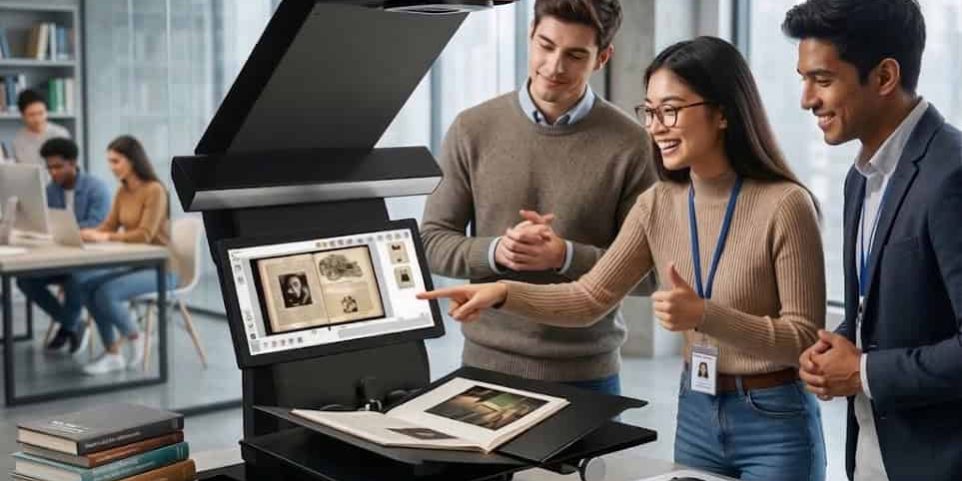
Book2net Scanner Library Experience: From Book to Phone in Seconds
The Photocopier Is Not a Student Experience
University libraries built before 2015 often feature the same scene: a photocopier in the corner, a line of students waiting, someone fishing for coins, and a book pressed face-down on glass while the machine grinds through its cycle. Paper copies slide out slightly crooked or smudged, and students may lose them within the week.
This setup creates friction rather than a positive experience. In 2026, when students’ academic lives run entirely through their phones — notes, readings, assignments, group chats, submission portals, handing out paper copies solves the wrong problem.
The alternative exists, is installed in leading university libraries, and students genuinely love it.
What Students Actually Want When They Scan
Student behavior around library scanning has shifted dramatically in the past five years. Today, the goal is a clean digital file, one that lives on a phone, opens in their annotation app, and is searchable when needed at 11 PM before an exam.
The ideal scanning process looks like this:
- Walk up to the scanner with a textbook or journal.
- Place the book open on the cradle.
- Press a single button.
- Receive a high-resolution PDF on their phone within seconds.
- Walk away: book intact, file ready to use.
This is exactly what book2net delivers. The gap between this experience and the traditional photocopier is where student satisfaction lives.
How book2net Works: Seamless From Book to Phone
book2net scanners are engineered specifically for self-service library environments. Their technology is fundamentally different from flatbed scanners or photocopiers, which is why the student experience is so much better.
The Overhead Design
Books rest naturally on a flat cradle below the scanner head. The camera captures the image from above without any glass pressing against the pages. No pressure is applied to the spine, and students do not need to force the book flat.
This design protects library books, especially copies that endure thousands of loans and makes scanning effortless. Students simply place the book, press the button, and the scan is complete.
Scan to Phone — Directly
Students immediately notice the convenience of scans delivered straight to their phone via email, QR code, or direct transfer. There’s no USB, no printing, and no waiting for files to upload to shared drives. PDFs appear on the phone before the student has even closed the book.
From that moment, the file integrates into their study workflow. Students can open it in Notability, GoodNotes, Adobe Acrobat, or any annotation app. They can share it with study groups, search the text if OCR is enabled, or read it while commuting. The scan lives wherever the phone does.
Fast, Quiet, No Coins Required
book2net captures a full scan in seconds. Operation is near-silent — no mechanical grinding, warm-up cycles, or paper jams. No coin or card payments are needed. For students scanning a chapter before a tutorial, the entire process takes under a minute.
Student Satisfaction: Why Library Equipment Decisions Matter
Student satisfaction has become a formal KPI tracked through national surveys, institutional reviews, and accreditation processes. The quality of library scanning equipment contributes directly to overall ratings.
A 2023 Sprinklr survey found that 86% of customers leave a brand after just two bad experiences. While this comes from a consumer context, the same psychology applies to libraries. Broken photocopiers, jammed coin machines, or illegible paper copies create negative impressions. Conversely, a student who gets a clean PDF in 45 seconds has a positive service experience, which accumulates across thousands of interactions per semester.
High-quality scanning equipment also affects student retention. Universities track whether students return each year and recommend the institution to peers. Libraries that invest in student-facing technology support these outcomes.
The Study Workflow Connection
Scan-to-phone resonates because it fits seamlessly into modern study habits. Most students use multiple devices — a laptop for writing, a phone for reading and annotating, a tablet for portability. Paper photocopies do not integrate with this workflow.
A PDF delivered to a phone allows:
- Annotation apps: Highlight, underline, and margin-note digitally across devices.
- Reference managers: Direct PDF integration with Zotero, Mendeley, and other tools.
- Study group sharing: Instant sharing via WhatsApp, Teams, or Google Drive.
- Late-night study access: Files are available without being in the library.
This makes book2net a tool that supports student life rather than interrupting it.
Why University Libraries Are Choosing book2net
Harvard University
Harvard University Library has deployed book2net scanners in one of the world’s most demanding research environments. Their large, diverse user base expects excellent service, and adoption of book2net reflects institutional-scale performance.
University of Lethbridge
The University of Lethbridge in Alberta uses book2net scanners as well. For Canadian institutions evaluating self-service scanning, peer adoption is critical context.
Common Outcomes Across Academic Libraries
Libraries that deploy book2net consistently report:
- Immediate student adoption without instructions.
- Reduced staff time answering scanner-related questions.
- Declines in photocopier usage, sometimes removing machines entirely.
- Improved student feedback on library technology.
Replacing the Photocopier: The Operational Case
Lower Maintenance Overhead
Photocopiers are mechanically complex and require frequent service. book2net scanners have fewer moving parts, no paper paths, and no toner or fuser maintenance.
No Payment Infrastructure
With no coin or card system, administrative complexity is eliminated, and student friction disappears.
Staff Time Redeployment
Fewer interruptions from jammed machines or payment issues allow staff to focus on higher-value tasks.
Space Efficiency
Overhead scanners have a smaller footprint than photocopiers, reclaiming valuable floor space in libraries.
Choosing the Right book2net Model
Libraries should consider:
- Collection format: Standard books or oversized materials like maps and drawings.
- Expected usage volume: Smaller branches versus main university libraries.
- Delivery options: Email, QR code, USB, cloud.
- Available space: Scanner placement affects patron flow and visibility.
ristech.com works with library directors and procurement teams to select the best book2net model.
Frequently Asked Questions
Q: How does a student receive their scan?
A: Directly to their phone via email or QR code. No printing or USB needed.
Q: How long does scanning take?
A: Most chapters scan in under two minutes from start to finish.
Q: Is training required?
A: No. The interface is self-service friendly.
Q: Are book2net scanners safe for fragile books?
A: Yes. The overhead cradle prevents pressure on the spine or glass contact.
Q: How does book2net affect student satisfaction scores?
A: Fast, direct PDF delivery fits study workflows, improving satisfaction metrics.
Q: Which universities are using book2net?
A: Harvard University and University of Lethbridge.
Q: How does it compare to a photocopier?
A: Faster, quieter, no coins or paper, lower maintenance, fits modern study habits.
Q: Is book2net available in Canada?
A: Yes. Ristech supplies the range to libraries across Canada and North America.
Ready to Transform Your Library’s Scanning Experience?
Students study, annotate, and collaborate on their phones. Libraries that deliver scans directly to devices meet students where they are. Contact Ristech to find the model that fits your library’s space, collection, and patrons.