Tablet Lending Program Public Libraries: A Complete Guide
Why Tablet Lending Is Now a Core Library Service
Public libraries have always adapted to community needs. Print collections gave way to audiobooks and DVDs. Computer terminals became Wi-Fi zones. Now, tablet lending is moving from a “nice-to-have” to an essential service.
Digital skills are required for everything from job applications to healthcare forms to schoolwork. Without a device, patrons can’t fully participate in modern life. Libraries are uniquely positioned to bridge this gap.
For library directors and administrators in Canada and North America, this is no longer a planning exercise. Decisions about equipment, software, and workflow will shape your program for years.
The Digital Divide Libraries Are Asked to Solve
Roughly one in four households in North America still lacks reliable internet or a personal device. The number is higher in rural areas, low-income communities, and among seniors—the same populations that rely heavily on public libraries.
Federal device lending programs in the U.S. are facing budget pressures, and Canadian libraries are monitoring this trend. When government access shrinks, local libraries pick up the slack.
Libraries are already responding. Halifax Public Libraries uses tech lending kiosks as part of a broader digital strategy. Edmonton Public Library runs active digital inclusion programs with devices and skills training. These are signs of a growing trend.
Globally, momentum is clear. A Libraries Connected webinar in March 2026 focused on an iPad lending blueprint, attracting library systems from across the UK and beyond. The question is no longer whether libraries should lend tablets. It is how to do it effectively.
What a Modern Tablet Lending System Looks Like
A tablet lending program is not just a pile of tablets with a sign-out sheet. That approach increases privacy risks, staff workload, and patron frustration. A well-designed system automates the hard parts and keeps the experience smooth.
Key components include:
- Self-service checkout so patrons don’t need staff for every loan
- Automatic data wiping between users to protect privacy
- Charging and device management built into the docking station
- Content management tools for librarians to control apps and profiles
- Theft deterrence to keep devices in the library
When all these elements work together, staff spend less time managing hardware and more time assisting patrons. This is the standard libraries should aim for.
Key Features in a Library Tablet Lending System
Not all tablet lending solutions suit libraries. Look for features that matter most:
Self-Service Checkout with Library Card Integration
Patrons should borrow a tablet in under a minute using their library card. A smooth, staff-free checkout removes barriers for those who most need access.
Automatic Privacy Reset Between Users
Every tablet must wipe previous user data automatically—browsing history, downloads, app data, login credentials. Manual resets by staff are a privacy liability.
Smart Docking Station
The docking station should charge tablets, auto-update apps, push configuration changes, and manage inventory without staff intervention.
Age-Appropriate Content Profiles
One tablet configuration doesn’t suit all patrons. Systems should support multiple profiles for children, teens, and adults.
Cloud-Based Management
Librarians should adjust content, review loans, and change settings from anywhere via a browser.
Theft Protection
Tablets should be inoperable outside the library to prevent theft.
Multilingual Support
Canadian libraries serve diverse communities. Multilingual platforms help patrons who speak French, Punjabi, Mandarin, Arabic, and more.
How Hublet Works: From Checkout to Return
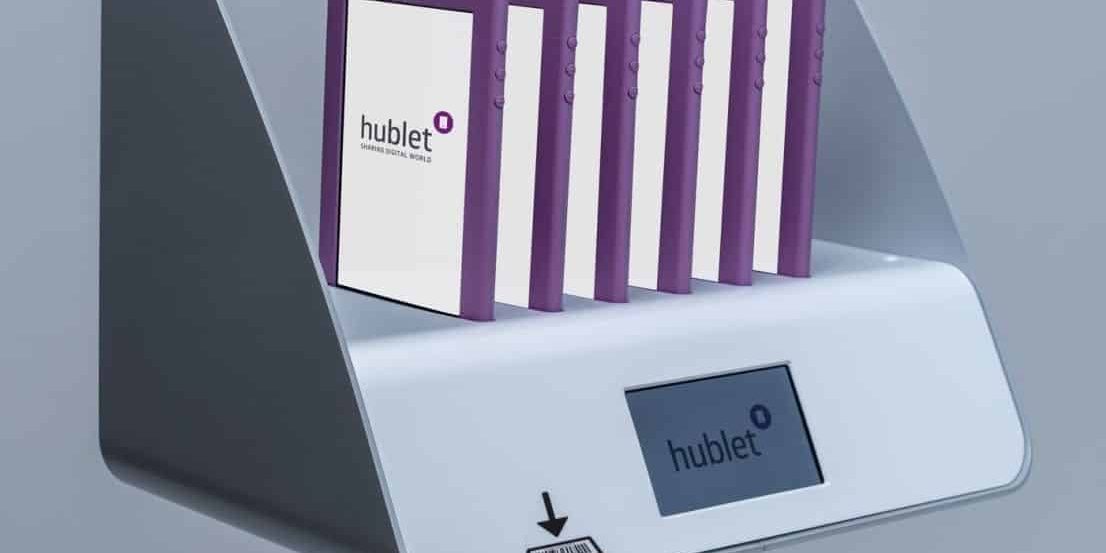
Hublet is a self-service tablet lending ecosystem designed for public libraries. Ristech is the authorized supplier for Canadian and North American libraries.
- Patron Approaches the Kiosk
The docking station holds charged tablets. The patron scans their library card. - Checkout in About 30 Seconds
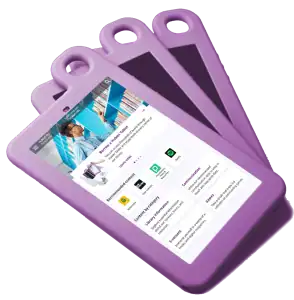
The system verifies the card and releases a tablet with the right content profile. - Using the Tablet
Tablets work within the library. Theft protection prevents removal. - Return and Automatic Reset
Returning the tablet wipes user data and begins recharging. It’s ready for the next patron in minutes.
Behind the Scenes: Hublet Manager
Librarians access Hublet Manager to view loan activity, device status, and content settings. Update apps, adjust loans, and monitor usage from any device.
Hublet Profiles
One pool of tablets serves children, teens, and adults with different content configurations. The system assigns profiles based on the library card category.
Real Libraries Doing This Well
Parkland Community Library shows how a library can deploy Hublet successfully. Staff time goes down, patron satisfaction rises, and the program is sustainable.
Halifax Public Libraries and Edmonton Public Library have built device lending into their digital access strategy. The key to success is using systems designed specifically for libraries.
How to Plan and Launch Your Tablet Lending Program
- Assess Community Needs – Determine how many tablets are needed and which profiles make sense.
- Define Loan Policies – Decide on loan duration, in-library or take-home use, and handling of lost or damaged devices.
- Choose Content Profiles – Include age-appropriate apps and digital tools.
- Plan Your Space – Place the docking station in a visible, accessible location.
- Train Your Staff – Ensure 2–3 staff members are comfortable with Hublet Manager.
- Promote the Program – Use newsletters, social media, signage, and partnerships. Highlight privacy and ease of use.
- Review and Adjust – After 60–90 days, adjust content, staffing, and placement based on usage data.
FAQs
Q: What is a tablet lending program in a public library?
A: Patrons borrow a tablet for in-library or short-term take-home use. Systems like Hublet automate checkout, privacy reset, and device management.
Q: How does Hublet protect patron privacy?
A: Tablets automatically wipe all user data upon return—no staff action needed.
Q: Can one set of tablets serve different ages?
A: Yes. Hublet Profiles assign content based on library card category.
Q: What happens if a patron tries to take a tablet outside?
A: Built-in theft protection makes tablets inoperable outside the library.
Q: How much staff time is required?
A: Minimal. Checkout, return, privacy reset, and charging are automated.
Q: Is Hublet available in Canada?
A: Yes. Ristech supplies Hublet to public libraries across Canada and North America.
Ready to Build Your Tablet Lending Program?
Digital inclusion is a mandate, and the tools are available. A well-implemented tablet lending program extends your library’s reach, serves patrons without device access, and runs efficiently.
Contact Ristech.com to schedule a free Hublet consultation and find the right configuration for your space, patrons, and budget.