Table of Contents
Why Digitizing a Book Collection Matters
- Phase 1: Planning Your Digitization Project
- Phase 2: Choosing the Right Scanning Equipment
- Phase 3: Scanning Standards and File Formats
- Phase 4: Building Your Digitization Workflow
- Phase 5: Storage, Access, and Preservation
- Common Challenges and How to Handle Them
- FAQs
Why Digitizing a Book Collection Matters
If you manage a library or archive, you already know the pressure. Physical collections age, degrade, and take up space. Researchers want remote access. Funding bodies want measurable preservation outcomes. Knowing how to digitize a book collection properly is no longer optional for institutions serious about long-term access.
This guide covers everything you need to plan and execute a large-scale digitization project, from initial collection assessment through equipment selection, scanning standards, workflow design, and long-term storage. Whether you are managing 10,000 volumes or 500,000 records, the same core principles apply.
Phase 1: Planning Your Digitization Project
Before you scan a single page, you need a plan. Institutions that skip this step tend to waste budget on the wrong equipment or scan materials in formats that do not meet preservation standards.
Assess Your Collection First
Start by auditing what you actually have. Categorize materials by format: bound books, loose documents, microfilm reels, oversized maps, photographs, newspapers. Each format has different handling requirements and calls for different hardware.
Also note condition. Fragile bindings, brittle paper, and water-damaged pages all affect how you scan. Some items may need conservation treatment before digitization. Skipping this step risks damaging irreplaceable materials during scanning.
Document the total volume. A collection of 100,000 items scanned at an average of 200 pages each equals 20 million page images. That number shapes every decision you make about staffing, equipment, timelines, and storage.
Set Clear Goals and Priorities
Not everything needs to be digitized at the same quality level or on the same timeline. Define your goals:
- Preservation: Archival-quality masters for long-term storage
- Access: Lower-resolution derivatives for online discovery
- Replacement: Scanning to retire damaged physical copies
Prioritize by value and demand. Rare books, unique manuscripts, and high-circulation items should move to the front of the queue. Duplicate copies of common titles can wait.
Phase 2: Choosing the Right Scanning Equipment
Equipment selection is where many institutions make expensive mistakes. The right scanner depends on your material types, throughput requirements, and budget.
Book Scanners for Bound Materials
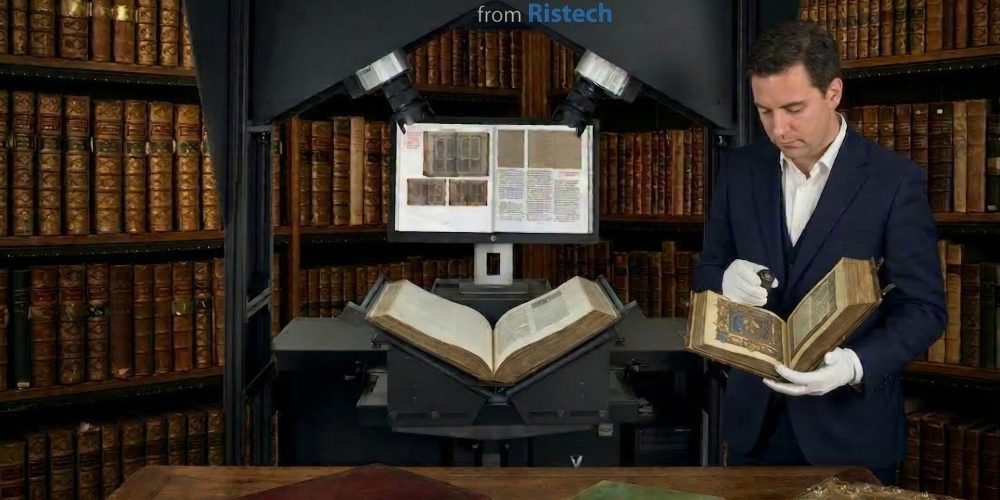
Standard flatbed scanners are not suitable for bound books. Pressing a spine flat against glass damages the binding and produces distorted images near the gutter. Book scanners use a V-shaped cradle or overhead capture system that lets you scan without stressing the spine.
For high-volume projects, planetary scanners with automatic page-turn detection and batch capture significantly reduce operator time per page. If you are digitizing rare books or fragile manuscripts, a non-contact overhead scanner is the safest option because the book never needs to be pressed open beyond a comfortable angle.
Ristech supplies a range of book scanners suited to different institutional needs, from compact desktop models for smaller collections to high-throughput units designed for large-scale library digitization projects.
Microfilm Scanners for Legacy Formats
Many archives hold decades of content on 16mm or 35mm microfilm. These reels cannot be scanned on a book scanner. Dedicated microfilm scanners read the film directly and produce digital image files, often at very high resolution to capture fine text detail.
If your collection includes newspaper archives, legal records, or government documents on film, a microfilm scanner is a non-negotiable part of your equipment list. Ristech carries microfilm scanning hardware suited to institutional workflows — browse our product catalog at ristech.com.
Large-Format Scanners for Oversized Items
Maps, architectural drawings, posters, and large-format photographs need scanners with a wider capture area. A standard A4 or letter-size scanner will not work here. Large-format scanners typically handle materials from A1 up to 60 inches wide, depending on the model.
When you are planning how to digitize a book collection that includes oversized items, budget for large-format hardware separately. These scanners are slower and more expensive per unit, but they are the only way to capture oversized materials without stitching together multiple scans, which introduces alignment errors.
Phase 3: Scanning Standards and File Formats
Getting the scan right the first time matters. Re-scanning is expensive and sometimes impossible if materials deteriorate further.
Resolution Guidelines
Resolution is measured in dots per inch (DPI). Standard benchmarks used by most national libraries and archives:
- Printed text: 300 DPI minimum (access), 400 DPI recommended (preservation)
- Handwritten manuscripts: 400 DPI minimum, 600 DPI recommended
- Photographs: 400 DPI minimum, 600 DPI recommended
- Maps and large-format: 300 DPI minimum, 400 DPI recommended
- Microfilm (text): 200 DPI minimum output, 400 DPI recommended output
These figures align with guidelines from the Federal Agencies Digital Guidelines Initiative (FADGI) and the Metamorfoze standards used across European archives.
File Format Recommendations
For archival masters, use uncompressed TIFF. It is large, but it is lossless and widely supported by digital preservation systems. JPEG compression introduces artifacts that degrade image quality over successive edits and format migrations.
For access copies, JPEG2000 offers a good balance of quality and file size. PDF/A is the standard for document delivery, particularly for text-heavy materials where users want to search and read rather than examine image quality.
Metadata matters as much as the image file. Embed descriptive metadata (title, date, creator, subject) and technical metadata (scanner model, DPI, color profile) in every file. Dublin Core is a widely accepted starting point for libraries and archives.
Phase 4: Building Your Digitization Workflow
A good workflow is what separates a successful digitization project from a chaotic one. Even with excellent equipment, poor workflow design creates backlogs, inconsistent quality, and metadata errors that are expensive to fix later.
Staffing and Training
Digitizing a book collection at scale requires dedicated staff. A typical workflow involves:
- Intake and preparation: Checking materials in, flagging fragile items, removing staples or bindings where appropriate
- Scanning: Operating the scanner, capturing images, naming files according to your naming convention
- Quality review: Checking each scan for focus, exposure, completeness, and correct orientation
- Metadata entry: Adding descriptive and technical metadata to each file or batch
- Upload and ingest: Moving files to your digital asset management system or repository
Train every operator on the specific scanner model they will use. A few hours of hands-on training per operator prevents weeks of re-scanning.
Quality Control Checkpoints
Build quality control into the workflow at multiple points, not just at the end:
- Operator-level QC: The scanner operator reviews each image immediately after capture
- Batch-level QC: A supervisor reviews a random sample (typically 10%) of each batch before it moves to metadata entry
- Final QC: A full review before files are ingested into the repository
Document every QC failure. Patterns in failures often point to equipment calibration issues, operator technique problems, or material handling errors that you can fix before they affect thousands of items.
Phase 5: Storage, Access, and Preservation
Scanning is only the beginning. Digital files need active management to remain accessible over time.
Follow the 3-2-1 backup rule: three copies of every file, on two different media types, with one copy stored off-site. For large collections, cloud storage combined with on-site NAS (network-attached storage) is a practical approach.
Choose a digital asset management system (DAMS) or institutional repository that supports your metadata schema and access requirements. Common options for libraries include DSpace, Fedora, and Omeka.
Plan for format migration. File formats become obsolete. TIFF is stable for now, but a 20-year preservation plan should include scheduled reviews of whether your formats still have adequate software support.
For public access, consider contributing records to an aggregator like Europeana, the Digital Public Library of America (DPLA), or a national library network to increase discoverability.
Common Challenges and How to Handle Them
Fragile or damaged materials: Work with a conservator before scanning anything that is actively deteriorating. For very fragile bindings, a non-contact overhead scanner is safer than any cradle-based system.
Inconsistent metadata: Establish a metadata style guide before scanning begins. Fixing metadata retroactively across 100,000 records is a significant project in itself.
Budget overruns: Digitizing a book collection costs more than most institutions initially estimate. Factor in staff time, equipment maintenance, storage infrastructure, and software licensing, not just hardware. Build a 15-20% contingency into your budget.
Throughput bottlenecks: If your QC process is slower than your scanning process, files pile up. Balance your staffing so that each stage of the workflow can keep pace with the others.
Vendor selection: Choosing the right hardware supplier matters for long-term support. Ristech (ristech.com) supplies book scanners, microfilm scanners, and large-format scanners alongside library automation systems. You can contact Ristech directly to request a quote or get guidance on which scanner models fit your collection type and volume.
FAQs
Q: How long does it take to digitize a book collection of 100,000 volumes? A: It depends on average page count, scanner throughput, and staffing levels. A high-throughput book scanner can capture 1,000 to 2,500 pages per hour with an experienced operator. A 100,000-volume collection averaging 200 pages per volume equals 20 million pages. At 2,000 pages per hour with two scanners running full time, that is roughly 5,000 hours of scanning time, not counting preparation, QC, and metadata work. Most large-scale projects run for two to five years.
Q: What is the best scanner for digitizing rare books? A: For rare books and fragile manuscripts, a non-contact overhead scanner is the safest choice. These scanners capture images without pressing the book open, which protects delicate bindings. Ristech supplies book scanners designed for institutional use, and their team can advise on the right model for your specific materials.
Q: What file format should I use for archival digitization? A: Uncompressed TIFF is the standard for archival master files. It is lossless and widely supported. For access copies, JPEG2000 or PDF/A are appropriate depending on whether users need image quality or document readability. Always embed metadata in your files and store masters separately from access derivatives.
Q: Do I need to hire a digitization vendor or can I do it in-house? A: Both approaches work. In-house digitization gives you more control over quality and workflow, and it is more cost-effective for ongoing or very large collections. Outsourcing makes sense for one-time projects or when you lack the staff capacity to run a scanning operation.
Q: How much does it cost to digitize a book collection? A: Costs vary widely. A basic book scanner for a small library might cost a few thousand dollars. High-throughput institutional scanners can run from USD 15,000 to USD 60,000 or more depending on the model. Add staff time, storage infrastructure, software, and metadata work, and a large-scale project can run into the hundreds of thousands of dollars over its lifetime. Getting accurate quotes from hardware suppliers like Ristech early in your planning process helps you build a realistic budget.
Q: What scanning resolution should I use for printed books? A: 300 DPI is the minimum for printed text intended for access use. For preservation masters, 400 DPI is the standard recommendation. Handwritten materials and photographs typically require 400 to 600 DPI to capture fine detail.
Q: Can I digitize microfilm and books with the same scanner? A: No. Book scanners and microfilm scanners are different types of hardware designed for different source materials. If your collection includes both bound volumes and microfilm reels, you need both types of equipment. Ristech supplies both book scanners and microfilm scanners, which simplifies procurement if you need to cover multiple format types in one project.
Digitizing a book collection at scale is a long-term commitment, not a one-time project. The institutions that do it well invest time upfront in planning, choose equipment matched to their actual materials, and build workflows that catch problems early. Start with a clear assessment of your collection, set realistic goals, and get the right hardware in place before you begin scanning. The rest follows from there.